 MemoryMedic
Find and delete duplicate photos on Android
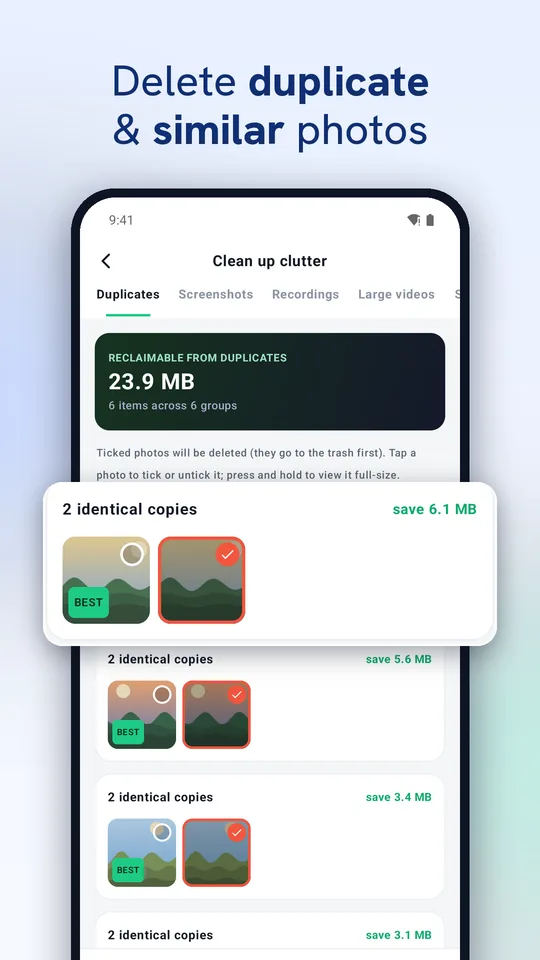
Duplicates sneak in from burst shots, apps that save their own copies, WhatsApp forwards and backups restored twice. Finding them by hand in a gallery of thousands is slow. Here's how to do it in a minute.
Exact duplicates
Open MemoryMedic and go to Smart Clean. Exact copies are grouped together and the best copy is marked BEST; the others are ticked for removal. Tap any photo to tick or untick it, or press and hold to view it full size.
Similar shots
Bursts and near-identical photos are grouped under Similar. Review each group and choose which ones to keep.
Blurry and dark photos
On-device AI flags blurry and very dark photos so you can review and remove the ones you don't need.
Screenshots and recordings
Screenshots and screen recordings get their own tabs, and large videos are listed by size.
Is deleting safe?
Photos you delete go to your phone's trash first, so you can still restore them from your gallery's trash for a while.
Questions
Does MemoryMedic delete anything automatically?
No. You review each group and confirm before anything is removed.
Does it work offline?
Yes. Duplicate detection runs entirely on your phone.
Try MemoryMedic free